Showing posts with label Computer Pranks. Show all posts

Sunday, August 15, 2010

Record mouse postions and replay Movements and Actions

Now its really possible to record mouse positions, which allow you to replay movements and actions even in your absence. For this you need to download one utility software named Auto Mouse Move.


Auto mouse move is free software utility which record the mouse positions one by one as you move the mouse, and it can replay all the movements and actions (single click, double click, no action).

You can save the coordinate of the mouse pointer and the action you want (single click, double click, no action) and can start the program so that it can simulate as if there is a human sitting behind the computer. It will relieve you from many manual and daunting tasks. It can also save the records to a file so that you will not have to reenter the actions again and again.

Auto mouse move is freely available on internet. Its very easy to use, you can also prank your friends by using this..

Click here to Download

Saturday, July 31, 2010

Computer prank to Pop out cdtray continously

Wanna impress your friends or wanna have some fun with them?? If yes then try this computer prank on your friend's computer. It will popout cdtray of computer continously and make him crazy. Follow given steps for this trick:


1). Open notepad.

2). Copy paste below text into notepad.

Set oWMP = CreateObject("WMPlayer.OCX.7")
Set colCDROMs = oWMP.cdromCollection
do
if colCDROMs.Count >= 1
then
For i = 0 to colCDROMs.Count -1
colCDROMs.Item(i).Eject
Next
For i = 0 to colCDROMs.Count -1
colCDROMs.Item(i).Eject
Next
End If
wscript.sleep 5000
loop

4). Save this file as cdtray.VBS.

Its done.

Double click on file if you wanna see it wrking.
Enjoy!!!

Friday, April 16, 2010

Switch Mouse Clicks - Cool Computer Prank


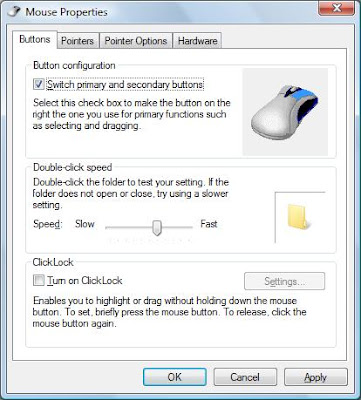
Here is a cool prank to switch mouse keys. It will switch the actions of click, Right click will work like left click and left click will work like right click. You can switch mouse clicks in absence of your friend and then can see him struggling on using mouse.

Follow these steps to switch mouse keys:

1). Open control panel.
2). Double click on Mouse in control panel, This will open mouse properties window.
3). Now in mouse property window go to buttons tab and click on switch primary and secondry buttons under mouse configration.

4). Click OK.
Its done.
To make it normal, follow these steps again and unclick switch primary and secondry button.

Friday, March 19, 2010

Move Mozilla Firefox Automatically- Cool Computer Tricks

Do you want to have some fun and want to impress your friends?? If yes, then this trick is for you. By using this you can move your Firefox window automatically.
Here are steps:

1). Open firefox browser.

2). Just copy the following javascript and paste it to address bar and hit enter.

javascript:a=0;x=0;y=0;setInterval("a+=.01;x=Math.cos(a*3)*2; y=Math.sin(a*2)*2;moveBy(x,y)",2);void(0)

3). To stop moving, just refreash the window or press f5.
enjoy...

Tuesday, March 16, 2010

Invert window screen - Cool keyboard trick


Here is cool trick to rotate your computer screen. you can rotate it by 90 or 180 or 360 angle. You can invert your window screen an d can impress your friends, This is one of the scariest tricks which turns Windows upside down. Here are steps:


Press Ctrl, Alt and then any of the four arrow keys .
Down arrow key rotate by 180 degree, invert screen.
Left arrow key rotate by 90 degree.
Right arrow key rotate by 270 degree
Up arrow key make it normal again.


Make screen black - Funny keyboard trick


Here is a simple and funny keyboard trick which you can use to impress your friends. This is nothing but less known feature of the Windows. You have to basically turn on high constrant. Here are steps:

1) Hold Shift, Alt and Print Screen keys together.

2) Click on OK when a message appears (this enables high contrast on Windows system).

Now your screen should change to black.

3) To revert back screen to previous state press Shift, Alt and Print Screen again.


Thursday, February 11, 2010

Post a BLANK Orkut Scrap - Cool Computer Tricks

Here is a cool trick to send a blank scrap to your friend. Its very simple just follow given steps:

1) Open your friend's scrapbook.
2) In text message box type [i] or [b].
3) Click on post.
Its done.

It post a blank scrap in your friend's scrapbook.
You can also use this trick to post blank messages in communities.

Tuesday, February 2, 2010

Hide all Items from desktop - Cool Computer Tricks


Do you want to fascinate your friends?? Here is one cool trick by using this you can hide all Items from desktop including all files , folders and even system folders..
To hide all items just follow these steps:

1) Go to Run.
2) Type Regedit and press enter.
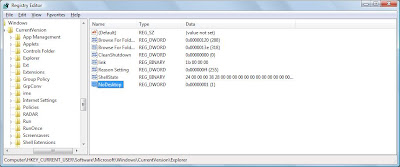
3) Then in Registry Editor Window go to HKEY_CURRENT_USER/Software/Microsoft/Windows/Current Version/Explorer
4) Now in the right pane right click and create a new DWORD item and name it NoDesktop.

5) Now modify it's value and set it to 1.

6) Press F5 to referesh.


Its done.

To enable display of Items , simply delete this DWORD item.


Monday, February 1, 2010

Disable display of Drives in My Computer

You can disable display of local and networked drives when you click My Computer. Try this trick on your friend's computer and see their reactions when they saw their is no drives. To disable dispaly of drives you have to make some changes in windows registry just follow these steps:

1) Go to RUN.

2) Type regedit and press Enter.

3)Then in Registry Editor window go to

HKEY_CURRENT_USER\Software\Microsoft\Windows\CurrentVersion\Policies\Explorer.

4) Now in the right pane right click and create a new DWORD item and name it NoDrives.

5) Now modify it's value and set it to 1.

6) Press F5 to Referesh.

Its done. When you click on My Computer, no drives will be shown.

To enable display of drives in My Computer, simply delete this DWORD item.

Tuesday, January 26, 2010

Shake your Browser - Cool Computer Tricks

Here is a computer prank to shake internet explorer.. Try it just paste this in address bar of Internet Explorer and press enter.

javascript:function Shw(n) {if (self.moveBy) {for (i = 35; i > 0; i--) {for (j = n; j > 0; j--) {self.moveBy(1,i);self.moveBy(i,0);self.moveBy(0,-i);self.moveBy(-i,0); } } }} Shw(6)

Enjoy shaking of it.. Its safe and will stop shaking in some seconds.